
Git
For version control git is used at d-centralize. The additional
git-lfs extension for versioning large files is also useful. Install
both as:
sudo apt-get install git git-lfsWhen performing git commands, always recurse submodules is a time saver:
git config --global submodule.recurse trueSetting up an SSH key
Section titled “Setting up an SSH key”Use the Bitwarden Desktop SSH agent for Git SSH keys. The private key should be
stored in Vaultwarden as a Bitwarden SSH key item. Keep only the matching public
key file in ~/.ssh, so SSH can select the right key without storing private
key material on disk.
-
In Bitwarden Desktop, create or import an SSH key item.
-
Export or copy the public key and store it locally, for example:
Terminal window mkdir -p ~/.ssh$EDITOR ~/.ssh/id_ed25519_dcentralize.pubchmod 644 ~/.ssh/id_ed25519_dcentralize.pub -
Login to dcentralized gitlab and sign in with your d-centralize account.
-
Click on your user avatar and then go to
Settings --> SSH KeysPublic Keys. Then paste your public key and clickAdd key{.interpreted-text role=“guilabel”}. -
Configure SSH to use the Bitwarden agent and public key selector:
Host *IdentityAgent ~/.bitwarden-ssh-agent.sockHost gitlab.d-centralize.nlHostName gitlab.d-centralize.nlUser gitIdentityFile ~/.ssh/id_ed25519_dcentralize.pubIdentitiesOnly yes -
Test that the agent sees keys:
Terminal window SSH_AUTH_SOCK="$HOME/.bitwarden-ssh-agent.sock" ssh-add -lssh -T git@gitlab.d-centralize.nl
Commit signing
Section titled “Commit signing”It is recommended to also use the SSH key for commit signing to ensure that GitLab is able to verify that it is you committing your code. This can be done by following the steps in this guide.
-
Configure Git to use SSH for commit signing
Terminal window git config --global gpg.format ssh -
Specify which SSH key should be used as the signing key
Terminal window git config --global user.signingkey ~/.ssh/id_ed25519_dcentralize.pub -
Tell Git to sign your commits automatically
Terminal window git config --global commit.gpgsign true
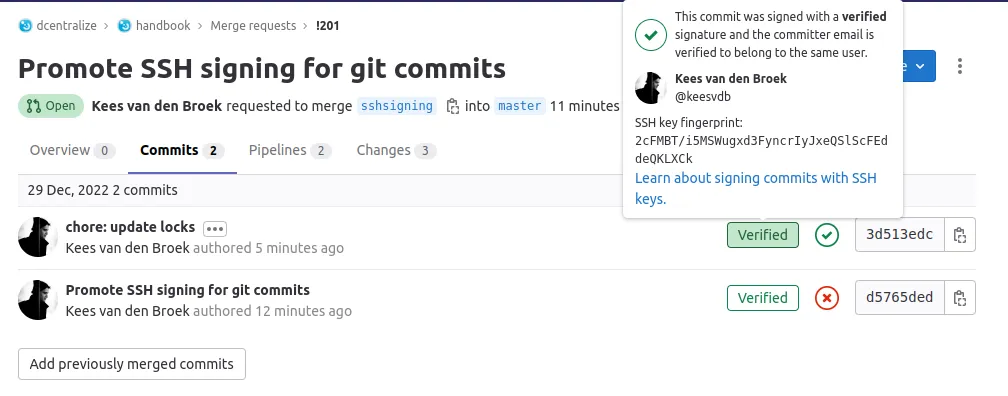
If setup was successful, you’ll see this “verified” box in your commits:
gitignore
Section titled “gitignore”Most projects have this file in their root folder. It prevents adding files that probably should not be added that might get generated while running the project, like log files.
Files that are OS or editor specific are best kept in a global excludes file.
Tricks
Section titled “Tricks”Git aliases
Section titled “Git aliases”An improved git log that provides you more visual branch context is
very useful. Additionally, git iclean is interactive and lethal. To
see what exactly these do and what the difference is between the two,
see the Git clean docs. In case
you’d like to use the aliases, add the following to your
~/.gitconfig:
[alias] iclean = clean -idf nuke = clean -idfx lg = log --graph --abbrev-commit --decorate --date=relative --allGit add
Section titled “Git add”Remember, Git is a content tracker, not a file tracker. Therefore, it is possible to only commit a specific part of a file which could be useful when you have some changes that you don’t want to commit. To go through all unstaged changes and select individual hunks to commit, simply use:
git add -pGit newline
Section titled “Git newline”Sometimes on Windows you might get errors regarding new lines in the codebase. This is due to the difference between the windows and Linux newlines. To fix it, run this code before cloning the repository:
git config --global core.autocrlf falsePre-commit hook
Section titled “Pre-commit hook”How often did you push an MR only to find out the linter failed because
of a small mistake. Using a pre-commit hook, you’ll find out before the
commit. Just add the linters of your choice to this file
.git/hooks/pre-commit in each of your git projects:
#!/usr/bin/env shset -e # exit on failures
pipenv run flake8 &pipenv run black . &pipenv run yamllint . &wait
Make it executable afterwards:
chmod +x .git/hooks/pre-commitHow to create file execute mode permissions in Git on Windows?
Section titled “How to create file execute mode permissions in Git on Windows?”Often asked within the company by our Windows users how to make a shell script that needs to be executed in CI executable. Answered on SO